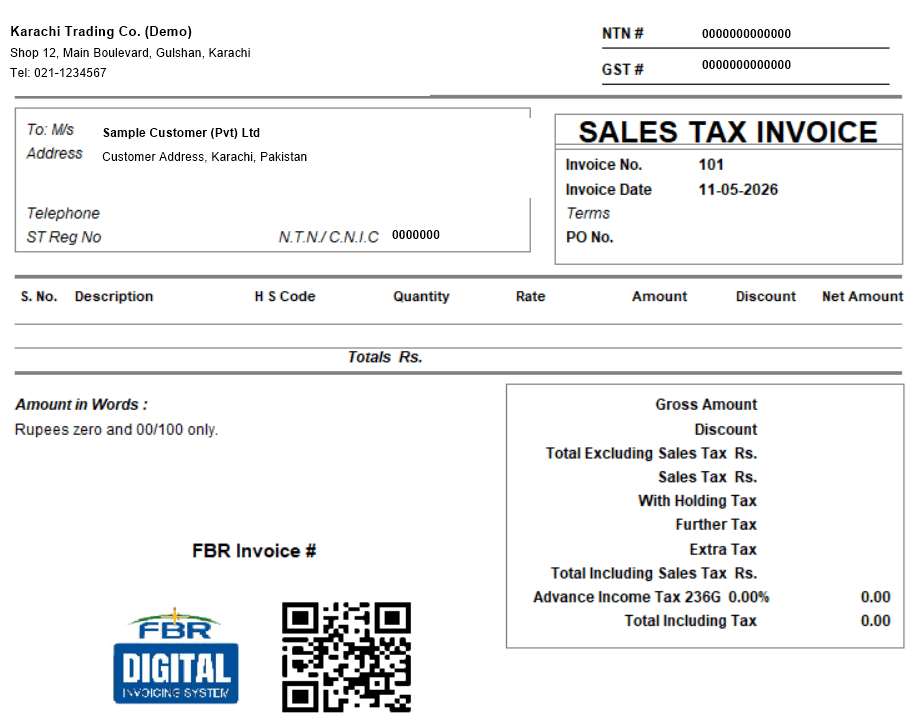
A GST invoice in Pakistan must show your NTN and STRN, the buyer's details, a serial number and date, each item with its HS code and quantity, the value excluding tax, the sales tax charged (standard rate currently 18% for most goods), and the total including tax. Below are free templates with all of those fields laid out — in Excel (tax auto-calculated), Word (fill in and print) and PDF (print and fill by hand).
Download the free GST invoice templates
This template gets the format right. AmalERP files it.
A template still leaves you typing every invoice by hand. AmalERP raises the invoice, reports it to FBR and brings the IRN and QR back onto it - from Rs 2,500/month. Send us a message and we will show you on your own numbers.
No sign-up needed. The Excel version calculates the sales tax and totals for you — enter quantity and rate, and the amount, tax and total fill in automatically at 18% (editable per line if an item has a different rate). All three open fine in free tools: the Excel file works in Google Sheets and LibreOffice, the Word file in Google Docs.
What's inside the template?
- Seller block: business name, address, NTN and STRN (GST number).
- Invoice number, date and PO number.
- Buyer block: name, address, and STRN / NTN / CNIC where required.
- Items table: serial number, description, HS code, quantity, rate, amount excluding tax, sales tax and line total.
- Totals: value excluding tax, sales tax, withholding / further / extra tax where applicable, and total including tax.
- Amount in words, and a note on the FBR digital invoicing extras.
Why not just use any invoice template from Google?
Because most of what ranks for "GST invoice format" is built for Indian GST — with GSTIN numbers, CGST/SGST/IGST splits and HSN summaries that don't exist in Pakistani law. Pakistan's requirements come from Section 23 of the Sales Tax Act 1990: NTN/STRN instead of GSTIN, one sales tax amount instead of Indian tax splits, and HS codes on line items. An Indian-format invoice can cost your registered buyer their input tax claim here.
Is this format FBR-compliant?
The fields match what Section 23 requires on a sales tax invoice, so for businesses outside the digital invoicing mandate, yes. But note: if your business is notified for FBR digital invoicing, a static template can never make you compliant by itself — each invoice must be submitted to FBR electronically and come back with a unique FBR invoice number (IRN) and QR code, which only FBR-connected software can do. Our FBR digital invoice format guide explains exactly what gets added.
How to fill in the invoice, step by step
- Enter your business details: name, address, NTN and STRN.
- Give the invoice a unique, sequential number and the issue date.
- Add the buyer's name and address — plus their STRN for B2B sales, or NTN/CNIC where required.
- List each item with description, HS code, quantity and rate; the Excel template computes amount, tax and total per line.
- Check the tax rate per line — 18% standard, but confirm item-specific rates or SRO exemptions where they apply.
- Write the total in words, keep a copy, and retain records for six years.
When a template stops being enough
Templates work at low volume. They stop working when you need sequential numbering you can't fat-finger, buyer records, stock that updates on every sale, GST and withholding reports at filing time — or when FBR notifies you for digital invoicing and every invoice needs a live IRN and QR code. AmalERP billing software does all of that, including FBR & SRB compliance as a Rs 1,000/month module on the Rs 2,500/month Basic plan, with a 7-day free trial.