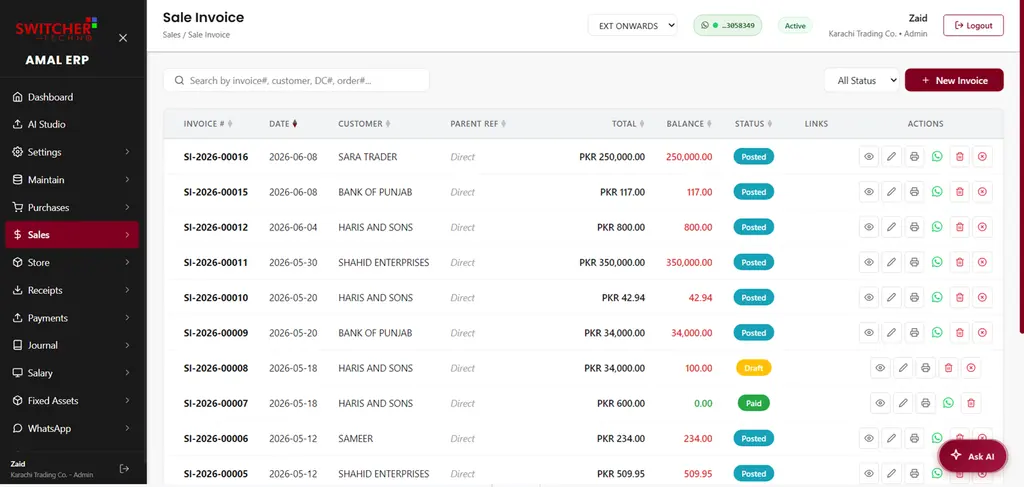
A valid sales tax (GST) invoice in Pakistan must show, under Section 23 of the Sales Tax Act 1990: the supplier's name, address and STRN; the buyer's details; a unique serial number; the date; a description and quantity of the goods; the value excluding tax; the sales tax amount; and the total including tax. Businesses under FBR digital invoicing must add an IRN, QR code and digital signature. Here is each field explained — and the mistakes that cost buyers their input tax claim.
Want the format rather than the rules? Download a ready sales tax invoice template with every Section 23 field already laid out — free, no signup.
This template gets the format right. AmalERP files it.
A template still leaves you typing every invoice by hand. AmalERP raises the invoice, reports it to FBR and brings the IRN and QR back onto it - from Rs 2,500/month. Send us a message and we will show you on your own numbers.
The Section 23 checklist: fields a valid sales tax invoice must show
| Required field | What to show |
|---|---|
| Supplier details | Your business name, address and sales tax registration number (STRN). |
| Buyer details | Buyer's name, address and registration number (for B2B sales). |
| Serial number | A unique, sequential invoice number — never reused or skipped. |
| Date of issue | The date the invoice is issued. |
| Description & quantity | What was sold and how much of it. |
| Value excluding tax | The amount before sales tax. |
| Sales tax amount | The tax charged, at the correct rate for the item. |
| Value including tax | The grand total with sales tax. |
| IRN, QR code, digital signature | Only if you fall under FBR digital invoicing (see below). |
The invoice may be issued in English or Urdu — both are accepted under the sales tax rules.
Who must issue a sales tax invoice?
Any person registered for sales tax must issue a serially numbered tax invoice for each taxable supply. The invoice is what allows the buyer (if registered) to claim the sales tax back as input tax — which is why customers care that yours is correct — and why most registered businesses move to billing software that fills these fields for them.
Selling to an unregistered buyer: when is CNIC or NTN required?
If you are a manufacturer or importer supplying to an unregistered distributor, the tax invoice must show that distributor's CNIC or NTN under Section 23(1)(b). For ordinary retail sales to end consumers, no buyer registration details are needed — your POS receipt with the standard fields is enough.
Extra fields under FBR digital invoicing
If your business falls under FBR's digital invoicing mandate, each invoice must also carry:
- A unique Invoice Reference Number (IRN) issued by FBR.
- A valid FBR QR code that customers can verify.
- A digital signature.
How to create a sales tax (GST) invoice, step by step
Putting the rules above into practice, creating a compliant invoice looks like this:
- Start from a unique, sequential invoice number — never reuse or skip numbers.
- Add your details: business name, address and STRN.
- Add the buyer's details: name, address and, for B2B sales, their registration number.
- List each item or service with its description, quantity and value excluding sales tax.
- Apply the correct sales tax rate for each item, and show the tax amount and the total including tax.
- If you fall under FBR's digital invoicing mandate, issue the invoice through software connected to FBR, so it comes back with its IRN, FBR QR code and digital signature in real time.
- Keep the invoice record — records must be retained for six years.
You can do this manually on a printed book or in Excel if you're outside the digital-invoicing mandate — but billing software that fills the fixed fields automatically and enforces sequential numbering removes most of the mistakes below.
Common mistakes that cause trouble
- A missing or wrong STRN/NTN.
- Invoice numbers that aren't unique or sequential.
- The wrong sales tax rate for the item.
- Leaving off the buyer's registration number on B2B sales.
- Not retaining invoice records (they must be kept for six years).
Why it matters
Your customer's input tax adjustment depends on a valid invoice, so errors cost you goodwill and repeat business. And under digital invoicing, an e-invoice can only be corrected within 72 hours through FBR — after that you need Commissioner approval. Getting it right the first time is far easier than fixing it later.
How AmalERP keeps invoices compliant
AmalERP generates sales tax invoices with every required field — auto-numbered, with your STRN/NTN, buyer details and correct tax. And because AmalERP connects to FBR's digital invoicing system through PRAL, invoices for businesses under the mandate carry the IRN, FBR QR code and digital signature automatically.