Generation Phase · since 4 December 2021
ZATCA e-invoicing Phase 1: what the Generation Phase requires
Since 4 December 2021, every VAT-registered business in Saudi Arabia must generate and store its tax invoices, simplified invoices, credit notes and debit notes electronically through a compliant system. Simplified (B2C) invoices must carry a QR code, standard (B2B) invoices must show the buyer's VAT number, invoices must be in Arabic, and the system must not allow issued invoices to be edited or deleted. Handwritten, Word and Excel invoices stopped being valid that day.
Last reviewed 10 September 2026 against ZATCA's e-invoicing regulation and guidelines.
Who must comply
Every VAT-registered resident, and anyone invoicing for them
Phase 1 draws its scope from VAT registration, not from company size or revenue. The wave system by revenue only arrives with Phase 2.
- All taxable persons resident in the Kingdom and registered for VAT
- Any third party issuing tax invoices on behalf of a resident taxable person (accountants, billing agents, marketplaces)
- Both invoice types: standard tax invoices (B2B / B2G) and simplified tax invoices (B2C)
- Credit notes and debit notes, which must be electronic and reference the invoice they adjust
- Out of scope: non-resident taxable persons, and supplies that are not subject to VAT
What counts as an e-invoice
ZATCA defines an e-invoice as a tax invoice generated in a structured electronic format by electronic means. Under Phase 1 the format is flexible — the invoice can be presented as a PDF or a printed receipt — but its origin is not.
Compliant origin
- ERP or accounting software
- POS / online cash register
- Cloud invoicing service
- E-commerce platform with locked invoices
Not an e-invoice
- Handwritten invoice or receipt book
- Word / Excel template, even saved as PDF
- Scanned paper invoice
- Any invoice that can be edited after issue
Mandatory fields
What a Phase 1 invoice has to show
The core fields come from Article 53 of the VAT Implementing Regulations; Phase 1 added the QR code on simplified invoices and the buyer's VAT number on standard invoices.
Standard tax invoice (B2B / B2G)
| Field | Note |
|---|---|
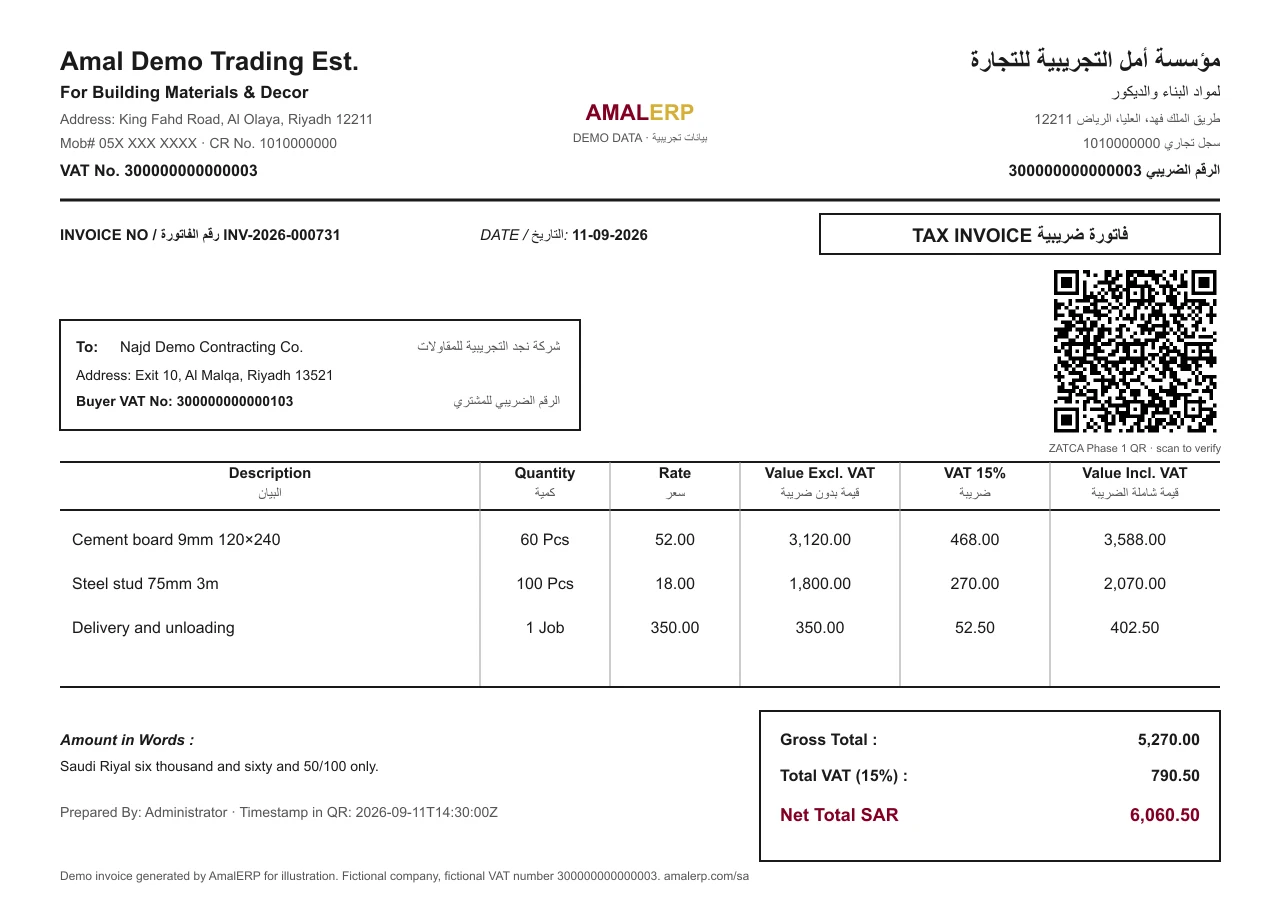
| Title “Tax Invoice” (فاتورة ضريبية) | Identifies the document type; a simplified invoice is titled “Simplified Tax Invoice” |
| Invoice number | Unique and sequential — gaps and duplicates are exactly what a ZATCA review looks for |
| Date of issue, and date of supply where different | Issue date and time in Phase 1; Phase 2 adds an ISO-8601 timestamp in the XML |
| Seller name, address and 15-digit VAT number | The VAT number starts and ends with 3; it also goes into the QR code |
| Buyer name, address and VAT number | The buyer's VAT number became mandatory on standard invoices with Phase 1 where the buyer is registered |
| Line items: description, quantity, unit price excluding VAT | Every line, not a single lump sum |
| Discounts or rebates not already in the unit price | Shown separately so the taxable amount is auditable |
| VAT rate per line | 15% standard, 0% zero-rated, or exempt / out of scope with the reason |
| Taxable amount, VAT amount and total including VAT | In Saudi riyals; the VAT amount must be its own figure |
| Credit / debit note reference | A note must reference the original invoice it adjusts — that is how corrections work instead of editing |
Simplified tax invoice (B2C)
| Field | Note |
|---|---|
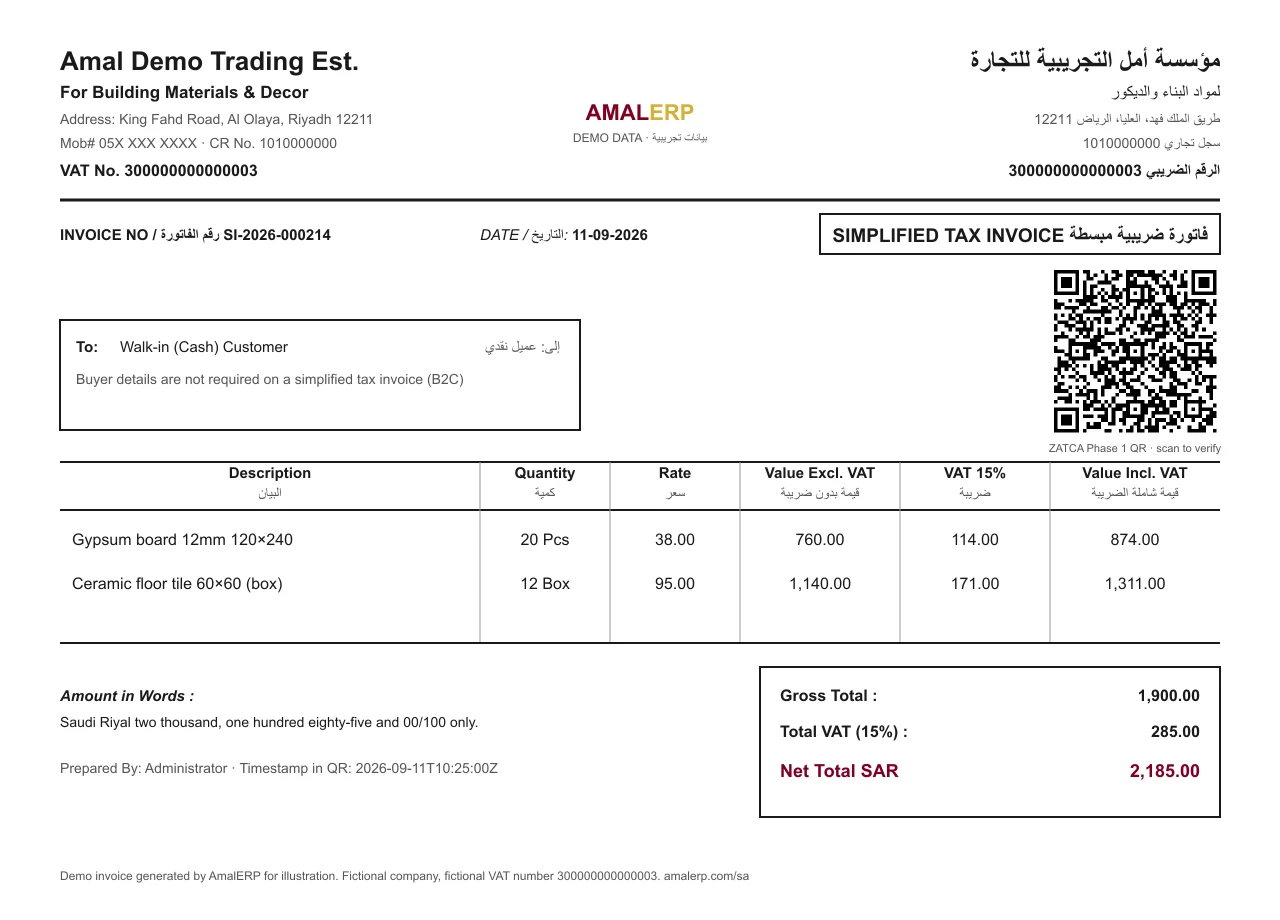
| Title “Simplified Tax Invoice” (فاتورة ضريبية مبسطة) | The document type for B2C supplies |
| Invoice number and date / time of issue | Sequential, from the POS or invoicing system |
| Seller name, address and VAT number | Buyer details are not required on a simplified invoice |
| Description of goods or services | Line level, with quantity where relevant |
| Total including VAT, and the VAT amount (or a statement that VAT is included) | Retail receipts usually show both |
| QR code | Mandatory since Phase 1 — five TLV tags: seller name, VAT number, timestamp, total with VAT, VAT total |
Not sure which type you should be issuing? Read standard vs simplified tax invoice.
What they look like
A simplified and a standard tax invoice, side by side
Both generated by AmalERP's bilingual Arabic/English template with demo data. The QR on each is a real Phase 1 code — scan it, or paste it into the decoder, and you get the five tags back.
The QR code
Five tags, base64, printed on every simplified invoice
The Phase 1 QR is not a link. It is a compact encoding of the invoice's key values so an inspector — or a customer — can scan and compare them with what is printed.
- 1Seller nameUTF-8, Arabic allowed
- 2VAT registration number15 digits, starts and ends with 3
- 3TimestampDate and time of issue, ISO-8601
- 4Invoice totalIncluding VAT
- 5VAT totalThe VAT amount on the invoice
Each record is one byte of tag, one byte of length and then the value; the whole byte array is base64-encoded into the QR. Phase 2 extends the same structure with tags 6–9. Full detail in ZATCA QR code explained.
Test your own receipt in 30 seconds
Scan the QR on any simplified invoice your system prints, paste the text (or upload a photo) into our free decoder and check the five values against the paper. It runs in your browser and uploads nothing.
Open the ZATCA QR decoderProhibited functions
What a compliant system must not be able to do
Phase 1 is as much about controls as about fields. ZATCA lists functions that an e-invoicing system must not offer; these are the ones that catch most spreadsheet-era setups.
Anonymous or uncontrolled access
The system must not allow invoices to be created without a logged-in user, and must manage user sessions. Shared, password-less terminals fail this test.
Editing or deleting an issued invoice
Once generated, an e-invoice or note cannot be modified or removed. Corrections are made by issuing a credit or debit note that references the original.
Invoices without a tamper-resistant log
Every generated invoice must be recorded in a log that cannot be altered without detection, so the sequence can be audited end to end.
Multiple invoice sequences without control
Numbering must be sequential per sequence and the system must not let users generate parallel or restarted sequences to hide gaps.
Time tampering and default passwords
The system clock must not be changeable by the user to back-date invoices, and default or absent passwords are not permitted.
Export of the stamping keys (Phase 2)
Once a system holds a cryptographic stamp, the private key must never be exportable — that is a Phase 2 control, but a Phase 1 buyer should check the vendor plans for it.
Storage and archiving
E-invoices, notes and the data behind them must be kept in line with Article 66 of the VAT Implementing Regulations and provided to ZATCA on request, in electronic form. Cloud storage is acceptable provided the taxpayer keeps access and control and can produce the records. A system that only prints and never stores is not compliant, and so is one that cannot export the archive when asked.
Language and currency
Tax invoices must be issued in Arabic. A second language may appear alongside it, which is how most bilingual Saudi invoices are laid out. Amounts are expressed in Saudi riyals; an invoice priced in another currency must still show the VAT amount in SAR.
Phase 1 vs Phase 2
What changed when the Integration Phase arrived
Phase 2 does not replace Phase 1 — everything on this page still applies. It adds the connection to ZATCA.
| Phase 1 · Generation | Phase 2 · Integration | |
|---|---|---|
| Start | 4 December 2021, everyone at once | 1 January 2023, in waves by VAT-liable revenue |
| Format | Any electronic format from a compliant system | UBL 2.1 XML (or PDF/A-3 with embedded XML) |
| Connection to ZATCA | None — generate and store locally | Real-time clearance (B2B) and 24-hour reporting (B2C) via Fatoora |
| QR code | Mandatory on simplified invoices, 5 tags | Both invoice types, 9 tags with hash, signature and public key |
| Security | Access control, no editing, tamper-resistant log | Adds cryptographic stamp (CSID), UUID, counter and hash chain |
| Onboarding | Not required | Compliance CSID → Production CSID via the Fatoora portal |
Checklist
Seven checks before you call yourself Phase 1 compliant
Run these against your current invoicing. Most take ten minutes; the last one decides what you buy next.
- 1
Confirm you are in scope
Phase 1 applies to every VAT-registered business resident in Saudi Arabia, and to any third party that issues tax invoices on a resident taxpayer's behalf. Non-resident taxable persons are out of scope. If you charge 15% VAT, you are in.
- 2
Stop issuing invoices from Word, Excel or a receipt book
An invoice typed into an editable document or written by hand is not an e-invoice, even if you email a PDF of it. Every invoice, credit note and debit note must come out of an electronic system that meets the requirements.
- 3
Check every mandatory field is on both invoice types
Use the two field tables on this page. The most common Phase 1 failures are a missing buyer VAT number on standard invoices, missing Arabic, and a QR code that is absent or does not match the printed totals.
- 4
Put a compliant QR code on simplified invoices
The QR must encode the seller name, VAT number, timestamp, total with VAT and VAT total as TLV records in base64. Scan one of your own receipts and check the five values against the paper — our free decoder does this in the browser.
- 5
Make sure the system blocks edits and deletions
Try to edit a posted invoice in your software. If it lets you, it fails Phase 1. The correct path is a credit note that references the original, with the original untouched.
- 6
Store invoices electronically and keep them retrievable
E-invoices and notes must be stored in electronic form under your control and be producible to ZATCA on request for the VAT record-keeping period. Cloud storage is fine; a system that cannot export its archive is not.
- 7
Plan for Phase 2 before you sign anything
Phase 2 has now reached the smallest VAT-registered businesses. A Phase 1-only system bought today will need replacing; ask any vendor, in writing, whether their software is onboarded with the Fatoora platform.
ZATCA Phase 1 and Phase 2 compliant
AmalERP issues ZATCA-compliant bilingual invoices with the Phase 1 QR code, and integrates with the Fatoora platform for Phase 2 clearance and reporting.
Available now
- Bilingual Arabic/English tax invoices and simplified tax invoices with your 15-digit VAT number and 15% VAT
- ZATCA Phase 1 QR code (base64 TLV: seller name, VAT number, timestamp, total, VAT) printed on every invoice
- Sequential, non-editable invoice numbering with a full audit trail — the Phase 1 control that matters most
- Credit and debit notes that reference the original invoice instead of editing it
- Structured customer, item and VAT data — the fields Phase 2 XML fails on when they are missing
- Phase 2 Fatoora integration: UBL 2.1 XML, cryptographic stamp, hash chain, real-time clearance of standard invoices and 24-hour reporting of simplified invoices
- Onboarding via Compliance CSID → Production CSID with the OTP from your Fatoora portal
Phase 1 invoicing from SAR 599/year
Bilingual invoices with the Phase 1 QR, locked sequential numbering, a real audit trail and clean VAT data — what Phase 1 demands and what Phase 2 is built on.
Start 7-day trialSee SAR pricing →FAQ
ZATCA Phase 1 questions
When did ZATCA e-invoicing Phase 1 start?
Phase 1, the Generation Phase, came into force on 4 December 2021 for all VAT-registered persons resident in Saudi Arabia and for third parties issuing tax invoices on their behalf. It has applied continuously since then; Phase 2, the Integration Phase, began adding obligations in waves from 1 January 2023.
What does Phase 1 actually require?
Four things: invoices, credit notes and debit notes must be generated by an electronic system rather than by hand or in an editable document; they must carry all the mandatory VAT fields plus the Phase 1 additions (a QR code on simplified invoices and the buyer's VAT number on standard invoices); the system must not allow prohibited functions such as anonymous access or editing issued invoices; and the invoices must be stored electronically.
Is a PDF invoice compliant with Phase 1?
A PDF generated by a compliant system can be, because Phase 1 does not mandate a specific file format — that came with Phase 2's XML requirement. What Phase 1 prohibits is the invoice being created or edited by hand: a PDF exported from a Word template does not qualify, while a PDF issued by accounting software that locks the invoice and logs it does.
Does every invoice need a QR code in Phase 1?
In Phase 1 the QR code is mandatory on simplified tax invoices (B2C) and optional on standard tax invoices (B2B). In Phase 2 it becomes required on both, with the QR on standard invoices produced after ZATCA clears the invoice.
Must the invoice be in Arabic?
Yes. Tax invoices in Saudi Arabia must be issued in Arabic; a second language such as English may be added alongside. Many international accounting tools fail this requirement out of the box, which is worth checking before you buy.
Can I use any accounting software for Phase 1?
Any electronic system that meets the requirements — an ERP, an accounting package, a POS, an online cash register or a cloud service — is acceptable. ZATCA does not certify Phase 1 software; the responsibility for compliance sits with the taxpayer, so the practical test is the checklist on this page.
What are the penalties for Phase 1 violations?
ZATCA lists violations such as not issuing or storing invoices electronically, missing QR codes or mandatory fields, and deleting or modifying issued invoices. Enforcement is warning-first for a first violation, with fines escalating for repeat violations within twelve months. The amounts and the current penalty-relief initiative are covered on our ZATCA penalties article and the main guide.
Does AmalERP meet ZATCA Phase 1 today?
Yes. AmalERP issues bilingual Arabic/English tax and simplified invoices with the Phase 1 QR code, and integrates with ZATCA's Fatoora platform for Phase 2 — standard invoices are cleared in real time and simplified invoices are reported within 24 hours, from a unit onboarded with a Production CSID. We are not listed in ZATCA's solution-provider directory and do not call ourselves 'ZATCA-approved', because ZATCA says listing is not an approval; what matters is your onboarding, which we walk you through.
I only sell to consumers. Does Phase 1 apply to me?
Yes, if you are VAT-registered. B2C sellers issue simplified tax invoices, and Phase 1 is where the QR code requirement on those receipts comes from. Every POS receipt from a VAT-registered shop, restaurant or online store must carry it.
What is the difference between Phase 1 and Phase 2?
Phase 1 is about how invoices are generated and stored: electronically, with the right fields, no editing, QR on simplified invoices. Phase 2 is about integration: the same invoices become signed XML documents sent to ZATCA's Fatoora platform — standard invoices cleared in real time, simplified invoices reported within 24 hours — from a system onboarded with a cryptographic stamp. Phase 2 does not replace Phase 1; it adds to it.
This page is general information, not tax advice. Confirm every requirement against the E-Invoicing Regulation, the Implementing Resolution and ZATCA's current guidelines on zatca.gov.sa before making compliance decisions. Last reviewed 10 September 2026.
Invoicing software built on Phase 1 controls
7-day free trial, no credit card required. ZATCA plans from SAR 599/year.
No credit card required · 200+ businesses across the Gulf and beyond.