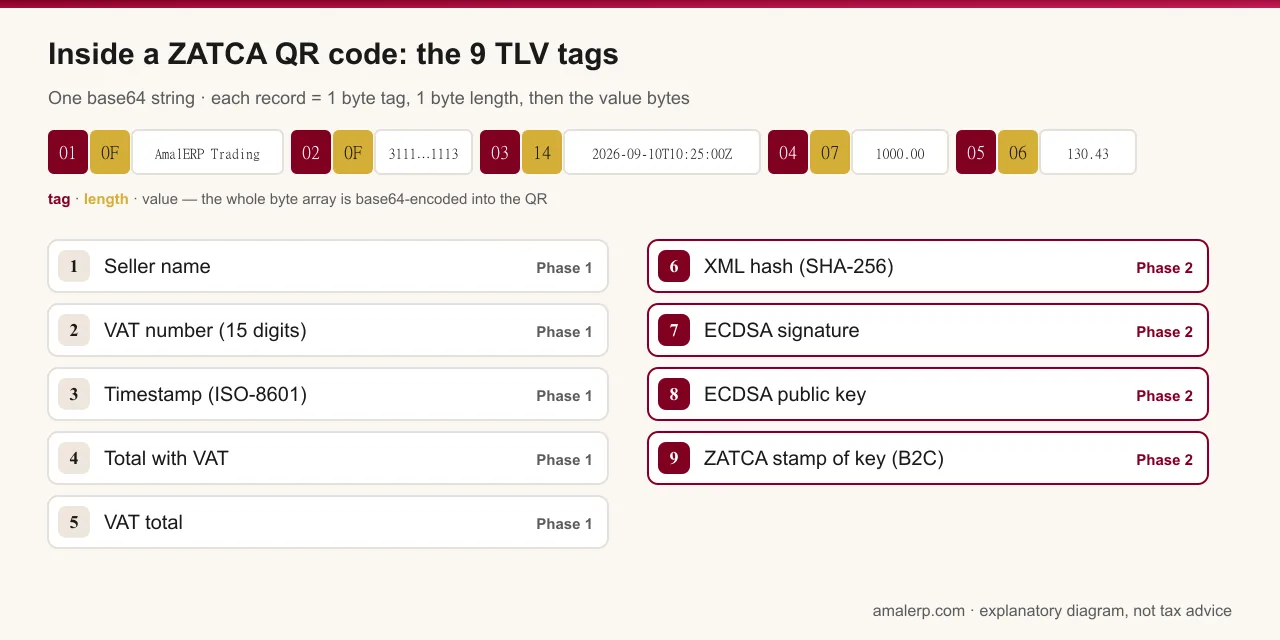
A ZATCA QR code is a base64-encoded list of TLV (tag-length-value) records. In Phase 1 it holds five tags — seller name, VAT registration number, invoice timestamp, invoice total including VAT and VAT total. Phase 2 adds four more — the SHA-256 hash of the invoice XML, the ECDSA signature, the invoicing unit's public key and, on simplified invoices, ZATCA's signature of that public key. Scan it with any phone and you get a block of text starting with 'AQ', not a web address.
What does TLV mean?
Each record is three parts: one byte for the tag number, one byte for the length of the value, and then the value itself. Text values are UTF-8, which is how an Arabic seller name fits without any special handling. The records are simply concatenated, and the whole byte array is base64-encoded into the QR. Because the length is a single byte, no value can exceed 255 bytes, and ZATCA's Security Features Implementation Standard (version 1.2) caps the encoded QR at 700 characters — earlier Phase 1 material said 500, which is where the two figures you see online come from.
A worked example: a seller called 'AmalERP Trading' with VAT number 311111111111113, invoicing SAR 1,000.00 including SAR 130.43 VAT at 10:25 on 10 September 2026, produces the string AQ9BbWFsRVJQIFRyYWRpbmcCDzMxMTExMTExMTExMTExMwMUMjAyNi0wOS0xMFQxMDoyNTowMFoEBzEwMDAuMDAFBjEzMC40Mw==. The first two bytes decode to tag 1, length 15, followed by the fifteen bytes of the seller name; then tag 2, length 15, and so on. Paste it into our decoder to see the five records laid out.
The nine tags
| Tag | Field | Since | Format and notes |
|---|---|---|---|
| 1 | Seller name | Phase 1 | The registered business name, UTF-8; Arabic allowed |
| 2 | VAT registration number | Phase 1 | 15 digits, starting and ending with 3 |
| 3 | Timestamp | Phase 1 | Date and time of issue in ISO-8601, e.g. 2026-09-10T10:25:00Z |
| 4 | Invoice total with VAT | Phase 1 | Decimal with two places, no currency symbol |
| 5 | VAT total | Phase 1 | Decimal with two places |
| 6 | Hash of the XML invoice | Phase 2 | SHA-256 of the signed invoice XML, base64 text |
| 7 | ECDSA signature | Phase 2 | Signature over the hash, made with the invoicing unit's private key |
| 8 | ECDSA public key | Phase 2 | The unit's public key, from its cryptographic stamp certificate (CSID) |
| 9 | ZATCA's signature of the public key | Phase 2 | Simplified invoices and their notes only — issued by ZATCA's technical CA at onboarding |
What changes between Phase 1 and Phase 2?
In Phase 1 the QR is a convenience check: anyone can scan a receipt and compare five values with what is printed. It has been mandatory on simplified tax invoices since 4 December 2021 and optional on standard tax invoices.
In Phase 2 the QR becomes cryptographic evidence. Tags 6 to 8 tie it to one specific signed XML document: change a single character of the invoice and the hash in tag 6 no longer matches, and the signature in tag 7 can be verified against the public key in tag 8. Tag 9 closes the loop for simplified invoices by carrying ZATCA's own signature over that public key, which it issued when the unit was onboarded on the Fatoora portal. The QR is required on both invoice types in Phase 2 — the invoicing system produces it for simplified invoices, and for standard invoices ZATCA produces it after clearance.
How do I read a QR from a receipt?
- Scan it with any phone QR scanner. You will see a block of text, usually starting with 'AQ' — the base64 payload.
- Copy the text and paste it into a TLV decoder such as our free tool, or upload a photo of the QR and let the tool read it in your browser.
- Check tags 1 to 5 against the printed invoice: same seller name, same VAT number, same timestamp, same totals.
- If tags 6 to 9 are present, the receipt came from a Phase 2 system. A decoder can show the values but cannot confirm the signature against ZATCA's certificate — only ZATCA's systems can.
The mistakes a decoder catches
- A VAT number that is not fifteen digits, or does not start and end with 3 — usually a CR number or a typo pasted into the wrong field.
- A timestamp that is not ISO-8601, or that differs from the invoice date because the QR was generated when the template was designed rather than when the invoice was issued.
- Totals that do not match the paper, which happens when the QR is produced from a different data source than the print layout.
- A VAT total that is not 15% of the net — fine on an invoice that mixes zero-rated or exempt lines, a red flag otherwise.
- Only five tags on a receipt issued after the business's Phase 2 wave deadline.
- Tags 6 to 8 present but tag 9 missing on a simplified invoice.
Can I generate my own QR code?
A Phase 1 QR can be built from the five values — our tool does that from your inputs so a layout or a developer build can be checked. What cannot be done by hand is producing tags 6 to 9: they need the invoicing unit's private key, the signed XML and — for tag 9 — ZATCA's signature issued at onboarding. A QR is only meaningful when it is printed by the compliant system on the invoice it describes; hand-made QR codes on invoices the system did not issue are exactly the kind of tampering the design exists to detect.
General information, not tax advice. The technical details are from ZATCA's Security Features Implementation Standard version 1.2 (19 May 2023); confirm against the current version on zatca.gov.sa.