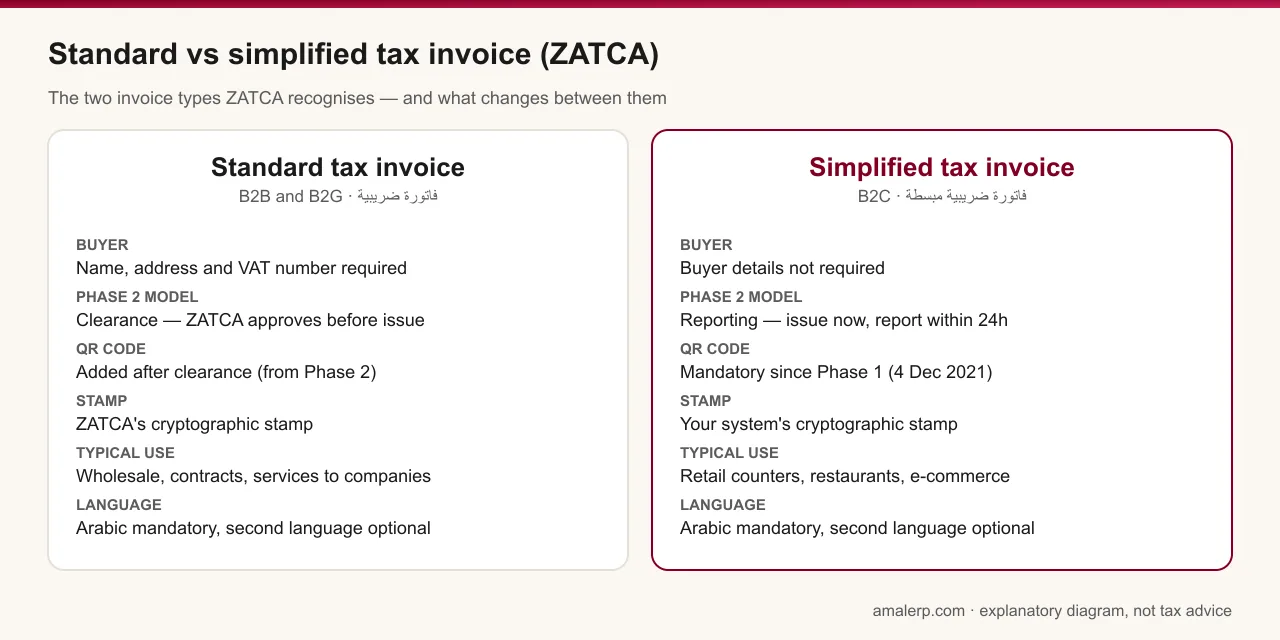
A standard tax invoice is the full invoice issued to a business or government customer; it carries the buyer's name, address and VAT number, and in Phase 2 it must be cleared by ZATCA in real time before it is issued. A simplified tax invoice is the shorter document issued to consumers — the receipt from a shop, restaurant, clinic or online store; it does not need buyer details, it has carried a QR code since Phase 1, and in Phase 2 it is issued immediately and reported to ZATCA within 24 hours.
Everything else on this page follows from that split. Get the type right and the fields, the QR code and the Phase 2 model all fall into place; get it wrong and you either deprive a VAT-registered customer of their input VAT deduction or find that your system cannot process the document at all.
When do you issue which type?
ZATCA's e-invoicing guidelines tie the invoice type to the customer: business-to-business and business-to-government supplies take a standard tax invoice; business-to-consumer supplies take a simplified tax invoice. The underlying VAT Implementing Regulations also allow a simplified tax invoice where the value of the supply is under SAR 1,000, which is why some articles describe a 'SAR 1,000 rule'.
The practical test is simpler than either wording: if the customer is registered for VAT and will want to deduct the VAT you charge, issue a standard tax invoice with their VAT number on it. A simplified invoice does not let them deduct, and you will be asked to reissue it. If the customer is a private individual, issue a simplified invoice. A wholesaler with a walk-in counter issues both types every day and needs software that handles both.
What must each invoice show?
| Field | Standard tax invoice | Simplified tax invoice |
|---|---|---|
| Title | 'Tax Invoice' — فاتورة ضريبية | 'Simplified Tax Invoice' — فاتورة ضريبية مبسطة |
| Invoice number and date | Sequential number, date of issue, date of supply if different | Sequential number, date and time of issue |
| Seller details | Name, address, 15-digit VAT number | Name, address, 15-digit VAT number |
| Buyer details | Name, address and VAT number (mandatory where registered since Phase 1) | Not required |
| Line items | Description, quantity, unit price excluding VAT, discounts, VAT rate per line | Description of goods or services, quantity where relevant |
| Totals | Taxable amount, VAT amount and total including VAT, in SAR | Total including VAT and the VAT amount, or a statement that VAT is included |
| QR code | Optional in Phase 1; added by ZATCA after clearance in Phase 2 | Mandatory since Phase 1 (5 tags); 9 tags in Phase 2 |
| Language | Arabic mandatory, second language optional | Arabic mandatory, second language optional |
How does Phase 2 treat them differently?
This is the difference that matters most for software. In the Integration Phase a standard tax invoice follows the clearance model: your system generates the signed XML and sends it to the Fatoora platform, ZATCA validates it, applies its own cryptographic stamp and QR code and returns it — and only that cleared version may be given to the customer. A simplified tax invoice follows the reporting model: your system applies its own stamp and QR code, issues the invoice immediately, and reports it to ZATCA within 24 hours.
| Standard (clearance) | Simplified (reporting) | |
|---|---|---|
| When ZATCA sees it | Before issue, in real time | After issue, within 24 hours |
| Who stamps it | ZATCA | Your onboarded invoicing unit |
| Works offline? | No — needs a live call before issue | Yes — issue now, report on reconnect |
| Typical issuers | Wholesalers, contractors, service firms, government suppliers | Shops, restaurants, pharmacies, e-commerce, clinics |
The offline point decides a lot of purchases. A retail POS can keep printing simplified invoices through an internet outage because reporting happens later; a B2B invoicing desk cannot finalise a standard invoice until Fatoora answers.
What about credit and debit notes?
Each type has its own notes. A credit or debit note against a standard tax invoice is itself a standard document and is cleared; a note against a simplified invoice is reported. In both cases the note must reference the original invoice, because editing or deleting an issued e-invoice is a prohibited function under Phase 1 and breaks the hash chain under Phase 2. Your software should not offer a delete button for posted invoices at all.
The mistakes we see most
- Issuing a simplified invoice to a VAT-registered business because the sale went through the till. The customer cannot deduct the VAT and comes back for a standard invoice.
- Issuing a standard invoice without the buyer's VAT number — mandatory since Phase 1 where the buyer is registered, and one of the two violations ZATCA inspectors check first.
- Assuming the QR code is optional on receipts. It has been mandatory on simplified invoices since 4 December 2021.
- Trying to issue standard invoices from an offline POS in Phase 2. Clearance needs the connection.
- Correcting an invoice by reissuing it with the same number. That is an edit in ZATCA's eyes; the fix is a note that references the original.
For the full Phase 1 field lists and the prohibited functions, see our Phase 1 page; for the wave table and the onboarding steps, the Phase 2 page. To check what a QR on one of your own receipts actually contains, paste it into the free decoder.
General information, not tax advice. Confirm the invoice rules against Article 53 of the VAT Implementing Regulations and ZATCA's current guidelines.