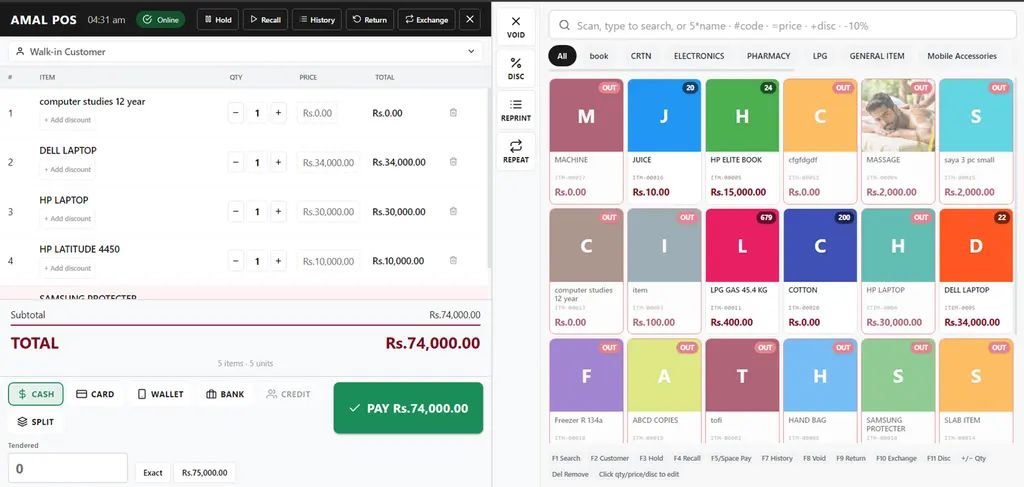
An offline POS keeps billing customers when the internet is down. Sales are written to the device instead of the cloud, receipts print as normal, stock still moves, and the moment the connection returns everything syncs up on its own. In Pakistan there is a second half to that answer that most guides skip: invoices you issue during an outage still have to reach FBR, and the clock on that starts when your connection comes back.
What “offline POS” actually means — and what it does not
Two different things get called “offline” and they are worth separating, because searching for one and buying the other is a real mistake.
Offline mode in POS software means the billing application keeps working with no internet. That is what this article is about.
An offline merchant account, or offline card processing, is a payments term. It means a card terminal stores the card data and authorises the transaction later, once it can reach the bank. That is a decision your payment provider makes, it carries real chargeback risk, and it has nothing to do with whether your POS software runs. You can have a POS that bills perfectly offline while your card machine refuses to take a payment — and in a cash-heavy market, that is usually fine.
How offline mode works, step by step
- Before the outage, the POS has already cached what it needs on the device: your item list, prices, tax rates and open customer balances.
- The connection drops. The POS detects it and switches to local mode — usually with nothing more than a small indicator changing colour.
- You keep billing. Sales are written to local storage on the device, receipts print, and stock is deducted against the cached item list.
- The connection returns. The queued sales upload in order, post to your accounts and inventory, and the local queue is cleared.
- Anything that could not post — a duplicate, a stale price, an item deleted while you were offline — is flagged for review rather than silently dropped.
That last point is the one that separates a real offline mode from a demo. Sync is easy when nothing goes wrong. What you are paying for is what the system does when two counters sold the last unit of the same item during the same outage.
What keeps working offline, and what waits
| Function | During an outage | Why |
|---|---|---|
| Billing and printing receipts | Works | Everything needed is cached on the device |
| Barcode scanning | Works | Scanner talks to the device, not the cloud |
| Stock deduction | Works locally | Deducted against the cached item list, reconciled on sync |
| Cash, multi-tender and returns | Works | Recorded locally and posted on sync |
| Live stock across branches | Waits | Another branch’s sales cannot reach you while you are offline |
| Posting to accounts | Waits | Journals are created when the sale reaches the server |
| FBR invoice number (IRN) and QR code | Waits | The IRN is issued by FBR, so it needs a live connection |
| Card payments | Depends on your terminal | This is your payment provider’s call, not your POS software’s |
Offline POS and FBR digital invoicing: the 24-hour rule
This is the part that matters most in Pakistan and gets the least coverage. Under FBR digital invoicing, a sales tax invoice is meant to be transmitted in real time and comes back carrying an IRN and an FBR QR code. If your connection is down, that round trip cannot happen at the moment of sale.
FBR’s published FAQs acknowledge the scenario: you may continue to issue invoices in offline mode during an internet or power outage, provided those invoices are uploaded to the FBR system within 24 hours of connectivity being restored. The clock starts when you come back online, not when the outage began. Failing to do so can attract penalties under Section 182 of the Sales Tax Act.
Separately, Sales Tax General Order No. 01 of 2026 limits corrections to an issued invoice to 72 hours through the FBR system. After that window, a change needs approval from the Commissioner Inland Revenue. So an outage that quietly loses three invoices is not a problem you can tidy up next week.
The practical consequence: for a sales tax registered business, “does it bill offline?” is only half the question. The other half is “does it queue those invoices and push them to FBR by itself once I am back online?” A POS that bills offline but leaves you to key those invoices into a portal by hand has moved the problem, not solved it.
What to look for in an offline POS
- Billing continues fully offline — creating and printing new sales, not just viewing old ones.
- Automatic sync on reconnect, with no manual re-entry and no button someone has to remember to press.
- Sales post to accounts and inventory after syncing, so your books are not a separate reconciliation job.
- A visible queue: you can see how many sales are pending upload, and which ones failed.
- Conflict handling that flags problems for review instead of overwriting or dropping them.
- For sales tax registered businesses: automatic FBR submission of queued invoices, inside the 24-hour window.
- It runs on the devices you already own, not a proprietary terminal you have to buy.
Five questions worth asking any POS vendor
- Show me a sale being created with the network switched off — not a slide about it.
- What exactly is cached on the device, and how long can it run before it goes stale?
- What happens if two counters sell the same last unit while both are offline?
- After reconnecting, what is the process for queued FBR invoices, and is it automatic?
- If a queued invoice is rejected by FBR, how do I find out — and where does it show up?
Why offline matters even when the internet is fine
Offline capability is not only insurance. A POS that reads from local storage does not wait on a round trip for every scan and every line added, so the counter is simply faster — most noticeably during a rush, which is exactly when a slow till costs you. Retailers who move to a properly offline-capable POS usually notice the speed before they ever notice an outage.
How AmalERP handles it
AmalERP’s POS bills fully offline during an internet or power outage and syncs automatically when the connection returns, posting each sale to your accounts and inventory. Touch billing, barcode scanning, multi-tender and returns all keep working at the counter, and receipts are FBR and SRB ready. The POS module is Rs 1,500 a month on top of the Rs 2,500 Basic plan, with one counter included per branch.
If you are comparing options, the honest advice is the same one above: ask every vendor on your shortlist to unplug the network and make a sale in front of you. It is a thirty-second test and it settles the question.