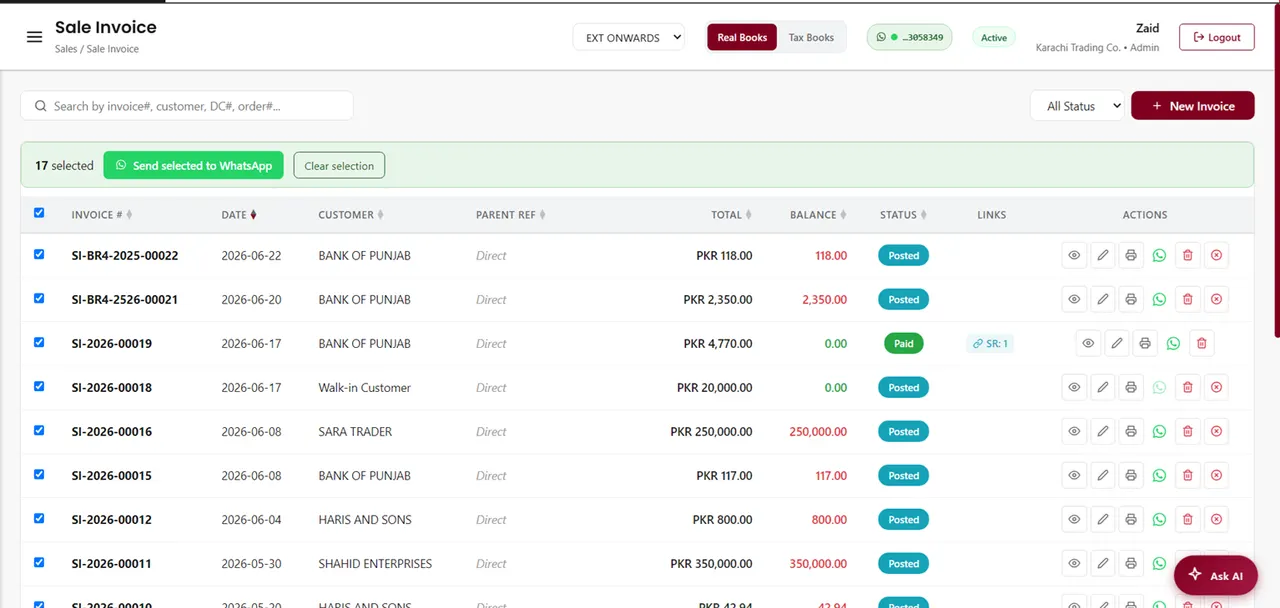
There are three ways to send an invoice on WhatsApp: attach the PDF by hand in a normal chat, use a broadcast list in the WhatsApp Business app, or send it straight from the system that created the invoice. All three work. They differ in how much manual effort they cost you, how many customers you can reach, and whether your accounts stay correct afterwards.
The three methods, side by side
| Method | Best for | Main limit |
|---|---|---|
| Attach the PDF manually | A handful of invoices a week | Every send is manual, and nothing is recorded against the customer |
| WhatsApp Business broadcast list | Sending the same message to many customers | 256 contacts per list, and only reaches people who saved your number |
| Send from your accounting or ERP system | Anyone invoicing daily, or chasing receivables | The invoicing has to live in that system in the first place |
Method 1 — attach the PDF by hand
Export the invoice as a PDF from whatever you use to make it, open the customer chat, tap the attachment icon, choose Document, pick the file and send. That is genuinely all there is to it, and for a business issuing a few invoices a week it is perfectly reasonable.
The cost is not the sending, it is everything around it. Nothing records that the invoice was sent, so a week later you are scrolling chats to work out who received what. There is no read receipt you can point to when a customer says they never got it. And it is easy to send the wrong file to the wrong person, which is worse than sending nothing.
Method 2 — WhatsApp Business broadcast lists, and their two hard limits
The free WhatsApp Business app lets you build a broadcast list and send one message to everyone on it, each person receiving it as a normal private chat. It is useful for statements and reminders. Two limits catch people out, and both are worth knowing before you build a process around it.
- A broadcast list is capped at 256 contacts. You can create more than one list, so a thousand customers means at least four lists and four sends.
- A broadcast only reaches people who have saved your number in their phone. If a customer has not saved you, your message is silently not delivered — you will not be told.
- Every recipient gets the same message, so you cannot attach each customer their own invoice this way. Broadcasts suit a general reminder, not individual documents.
The saved-number rule is the one that quietly breaks things. A reminder run that looks like it went to 250 customers may have reached 90 of them. If you rely on broadcasts, ask customers to save your business number at the point of sale.
Sending at real volume, to people who have not saved you, means moving to the WhatsApp Business Platform (the API). That lifts the 256 cap, but it requires documented opt-in for every contact — consent, with a timestamp and a source — and messages start inside daily tiers rather than unlimited.
Method 3 — send from the system that made the invoice
The version that scales is sending the document from the same place it was created, so the send is recorded against the customer and your books do not drift. Practically this means linking your company WhatsApp number to your accounting or ERP system once, after which every invoice, receipt, sale order and statement carries a send button.
What you gain over the manual route is not really speed. It is that each document is attached to the right customer automatically, the send is logged, and a delivery record tells you what landed and what was actually opened — which is the difference between guessing who to chase and knowing.
Does a WhatsApp invoice count as a proper invoice in Pakistan?
This is the question that causes the most confusion, and the answer is simpler than it looks: WhatsApp is a delivery channel, not a compliance step.
If you are registered for sales tax, FBR digital invoicing requires the invoice to be issued through your integrated system and reported to FBR, which returns an invoice reference number (IRN) and a QR code. That reporting is what makes the invoice valid. The PDF you then send your customer — by WhatsApp, by email, or printed across the counter — is their copy of that same reported invoice, and it should carry the IRN and QR on it.
So sending on WhatsApp does not replace anything, and it does not put you at risk. What would put you at risk is generating a separate PDF outside your reported records and sending that instead. Send the real document, not a lookalike.
Chasing overdue payments without the awkwardness
Receivables are where WhatsApp earns its place. A statement showing what is outstanding and since when does the asking for you, which is far easier to send than a message you have to word yourself. Sending statements in bulk turns a morning of individual follow-ups into one pass, and a delivery log with read receipts tells you who has seen it — so the phone calls go only to the people who read the statement and still have not paid.
Mistakes that get your number restricted
- Messaging people who never gave you their number or did business with you. Report rates, not message volume, are what get numbers restricted.
- Identical marketing blasts to large lists. Invoices and statements are transactional and expected; promotions are not.
- No easy way to opt out. Honour a stop request the first time you are asked.
- Using a personal number for the whole business, then losing the account and the history with it.
- Sending during the night. It is legal and it is still a good way to get reported.
How AmalERP does it
AmalERP has WhatsApp invoicing built in. You link your company WhatsApp number once with a QR code — your customers install nothing and receive messages on the WhatsApp they already use. After that, every invoice, receipt, sale order and statement has a Send to WhatsApp button that delivers a branded PDF in one tap, and you can send bulk statements and payment reminders to many customers at once with a full delivery log and read receipts.
Because the document is the same one recorded in your books, receivables, stock and the ledger stay in sync automatically. WhatsApp invoicing is included in the Premium plan; on Basic or Standard it can be added for Rs 2,500 a month, billed annually.