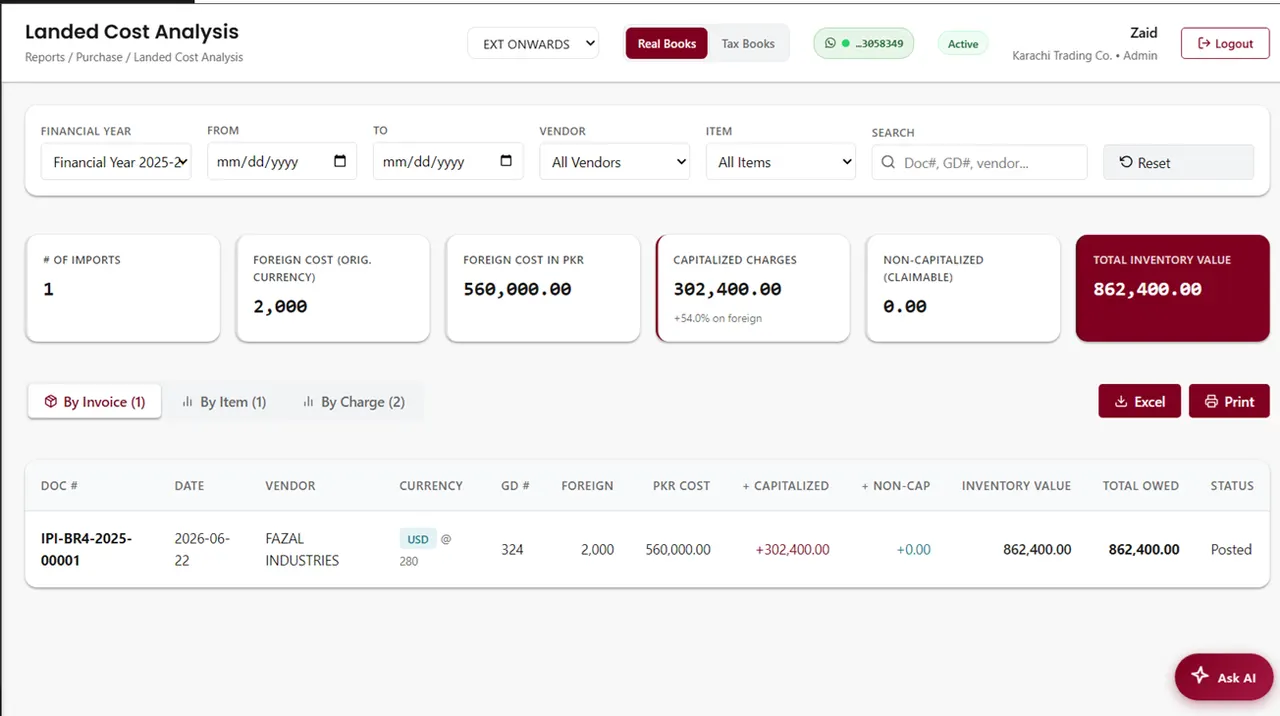
Landed cost (often called landing cost) is the full cost of an imported item once it is in your warehouse: the supplier's price plus duty, freight, insurance, clearing, port and bank charges, and transport to your godown. Spread those charges across the items in the shipment and divide by quantity, and you get the real cost per unit. Price from that figure, not from the supplier invoice.
What does landed cost include?
Everything you have to pay to get the goods from the supplier to your shelf belongs in landed cost. For a typical import into Pakistan that means:
- The supplier's price, converted into rupees at the exchange rate you actually paid.
- Customs duty and any other duties charged on the goods declaration (GD), such as regulatory or additional customs duty on some items.
- Sea or air freight, and marine or cargo insurance.
- Clearing agent fees, port, terminal and handling charges.
- Bank charges for the LC or payment to the supplier.
- Transport from the port or dry port to your warehouse.
What should you leave out of landed cost?
Taxes you get back are not a cost of the goods. The accounting standard on inventory, IAS 2, puts import duties into stock cost but excludes taxes that are later recoverable from the tax authorities. In practice that means two common items stay out of your landed cost:
- Sales tax paid at import, if you are registered and can claim it as input tax. If you cannot claim it, it becomes part of the cost.
- Income tax collected at the import stage. It is a payment towards your income tax, not a cost of the stock, so it belongs in your tax accounts.
- Abnormal costs such as demurrage caused by your own delay are usually booked as an expense rather than added to stock. Agree the treatment with your accountant and apply it every time.
How do you calculate landed cost per item?
- Step 1 — Convert the supplier invoice into rupees for each line.
- Step 2 — Put item-specific charges on their own line. Duty is the big one: different items carry different rates, so take each line's duty from the goods declaration rather than spreading the total.
- Step 3 — Add up the shared charges: freight, insurance, clearing, port, bank and transport.
- Step 4 — Spread the shared charges across the lines by value, weight or quantity.
- Step 5 — Add each line's value, duty and share of charges, then divide by its quantity. That is the landed cost per unit.
A worked example in rupees
A trader imports three items from China on one invoice of USD 10,000, at an example rate of Rs 280 per dollar. The figures below are illustrative; your duty rates depend on each item's tariff heading, and the duty amounts should come from your own goods declaration.
| Item | Quantity | Weight | Invoice value (Rs) | Duty on GD (Rs) |
|---|---|---|---|---|
| A — kitchen sets | 1,000 | 2,000 kg | 1,120,000 | 245,000 |
| B — blenders | 500 | 500 kg | 1,120,000 | 330,000 |
| C — plastic storage boxes | 2,000 | 1,500 kg | 560,000 | 65,000 |
| Total | 4,000 kg | 2,800,000 | 640,000 |
The shared charges come to Rs 440,000: sea freight Rs 280,000, insurance Rs 14,000, clearing and port charges Rs 70,000, bank charges Rs 28,000 and transport to the godown Rs 48,000. Sales tax and income tax paid at import are left out, because the trader is registered and claims them back.
Spread by value, item A and item B each carry 40% of the shared charges (Rs 176,000) and item C carries 20% (Rs 88,000):
| Item | Value + duty + share (Rs) | Landed cost per unit | Supplier cost per unit | Increase |
|---|---|---|---|---|
| A | 1,120,000 + 245,000 + 176,000 = 1,541,000 | Rs 1,541 | Rs 1,120 | 37.6% |
| B | 1,120,000 + 330,000 + 176,000 = 1,626,000 | Rs 3,252 | Rs 2,240 | 45.2% |
| C | 560,000 + 65,000 + 88,000 = 713,000 | Rs 356.50 | Rs 280 | 27.3% |
| Total | 3,880,000 | 38.6% |
The whole shipment cost Rs 3,880,000 to land against a supplier invoice of Rs 2,800,000. A trader who prices item C at supplier cost plus 30% (Rs 364) thinks he is making Rs 84 a box. He is actually making Rs 7.50.
Should you allocate by value, weight or quantity?
Use the basis that drives the charge. Insurance and bank charges follow value, so spread them by value. Freight is charged on weight or volume, so when the items differ a lot in bulk, spread freight by weight or cubic metres. Quantity only makes sense when every unit is roughly the same size and price.
The choice changes the answer. In the example above, spreading the Rs 440,000 by weight instead gives item A Rs 220,000, item B Rs 55,000 and item C Rs 165,000. Item C's landed cost rises from Rs 356.50 to Rs 395 a box, above the Rs 364 selling price. Item B falls from Rs 3,252 to Rs 3,010. Bulky, cheap goods hide their real cost when freight is spread by value.
| Item | Landed cost per unit — by value | Landed cost per unit — by weight |
|---|---|---|
| A | Rs 1,541 | Rs 1,585 |
| B | Rs 3,252 | Rs 3,010 |
| C | Rs 356.50 | Rs 395 |
How do you calculate landed cost in Excel?
Put one row per item: name in column A, quantity in B, weight in C, invoice value in rupees in D, duty from the GD in E and its share of charges in F, with the total shared charges in cell H1. For a value-based share, the formula on row 2 is =D2/SUM($D$2:$D$4)*$H$1. For a weight-based share, swap the value column for the weight column: =C2/SUM($C$2:$C$4)*$H$1. Landed cost per unit is then =(D2+E2+F2)/B2, where F2 holds the share. Check that the shares add back to the total charges before you use the figures.
The spreadsheet works for one shipment. It breaks down when charges arrive weeks later, when a shipment is part-sold before the clearing bill comes in, or when the landed cost has to flow into your stock value and profit reports by hand.
How does landed cost affect stock value and profit?
Your stock should be valued at landed cost, not supplier cost. If it is not, the balance sheet understates stock and every sale shows a profit that is too high, until the freight and duty turn up as a large expense somewhere else. When you use weighted-average costing, each new shipment's landed cost is blended into the item's average, so the cost on your sale invoices moves as import costs change. See FIFO vs weighted-average costing for how the method changes profit.
How does AmalERP handle landed cost?
You record the import purchase, enter the duty, freight, clearing and other charges once, and AmalERP spreads them across the items by value, quantity or weight, updating each item's cost and your stock value. Stock is then valued at weighted-average cost across your locations, and the Document Attachments module keeps the bill of lading, GD and clearing papers attached to the shipment. The Import Purchase & Landed Cost module is Rs 1,200 a month on top of the Basic plan at Rs 2,500, billed annually. See how it fits an importer's setup or our inventory software.